
How to choose the best receptionist VoIP phone in South Africa
The front desk is the busiest phone in the building. Here is what actually matters on a receptionist VoIP handset in 2026 – the keys, the display and the sidecar that keep callers moving instead of stacking up on hold.
What makes the best receptionist VoIP phone?
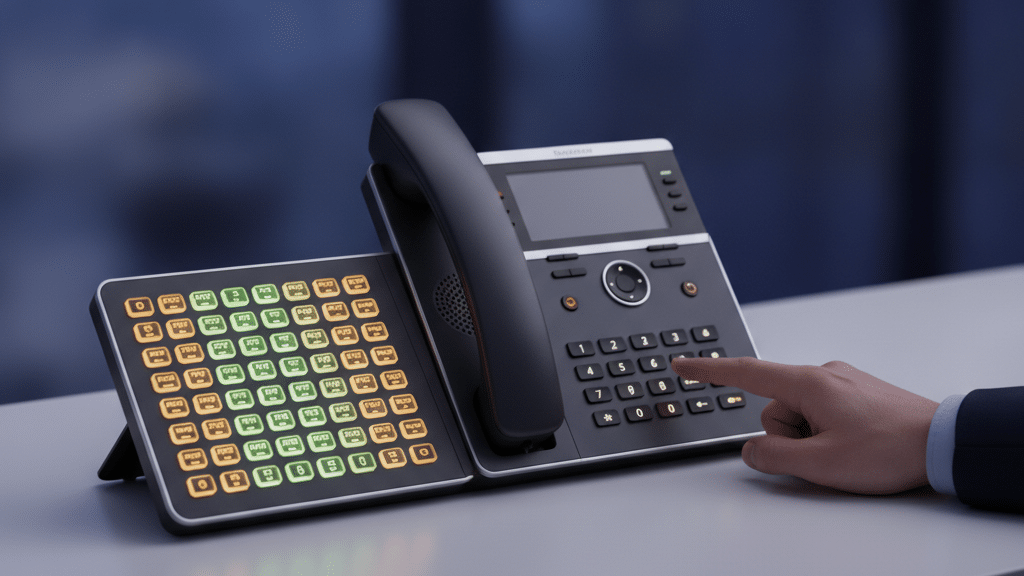
The best receptionist VoIP phone pairs a large, backlit multi-line display with plenty of programmable Busy Lamp Field (BLF) keys and room for at least one expansion module. Those three things let a front desk see who is free at a glance and transfer callers in one touch, instead of drowning in hold time and shouted questions across the office.

Why a standard VoIP phone fails at the front desk
A good desk phone built for the average user, who takes a handful of calls a day, is the wrong tool for the person who runs the whole building’s phones.
The receptionist is the communications hub of the company. They field incoming calls, route each one to the right person and keep an eye on who is actually available, often all at the same time. Hand that person a basic handset with two or four line keys and it is like asking a chef to cater a banquet with a single pot. Callers wait longer, transfers get fumbled, and the whole office hears the tell-tale question shouted across the room: “Is she available?”
That friction is not a training problem. It is a hardware mismatch. A front-desk phone needs to show call state and colleague status at a glance, and it needs enough physical keys to reach every extension in one press. Get the hardware right and the receptionist looks effortless. Get it wrong and every busy period turns into a bottleneck.
How a receptionist handles a call in one touch
The two non-negotiables: BLF keys and expansion modules
Two features do most of the heavy lifting on a front desk. Understand these and the rest of the spec sheet falls into place.
What a Busy Lamp Field (BLF) key does
A Busy Lamp Field key is a programmable button with a small LED, mapped to one colleague’s extension. The light tells the receptionist that person’s status at a glance: steady green when the line is free, steady red when they are on a call, and a blinking light when their phone is ringing. The same key doubles as a speed dial and a transfer target, so passing a caller through is a single press rather than a memorised extension number or a string of transfer codes. That is the difference between a smooth front desk and a slow one.
When you need an expansion module (sidecar)
An expansion module, or sidecar, is a separate panel of extra programmable keys that clips onto the side of the phone. Each module typically adds around 20 keys, and several can be stacked. A front-desk handset usually ships with somewhere between 8 and 16 built-in keys, which is fine for a small team. The moment your headcount passes that, a sidecar lets the receptionist still monitor and reach every extension with one touch, so the phone grows with the business rather than being outgrown by it.
The receptionist phone feature checklist
Beyond BLF keys and a sidecar, a front-desk handset has to be built for high volume and constant switching between callers. These are the features worth insisting on.
Multi-line display
- ScreenLarge, backlit
- ShowsCaller ID, held, transferring
- WhySee every call state without menus
Call handling keys
- TransferBlind & attended
- Park & pickupOne-touch
- Soft keysProgrammable
Audio & network
- AudioHD voice (G.722)
- LANDual Gigabit ports
- PowerPoE
A few more that separate a proper front-desk phone from a repurposed office handset: clear line-appearance visibility so ringing, active, held and parked calls never blur together; queue and ring-group awareness so the receptionist can pull waiting callers manually at peak; distinct ringtones for direct, queue and internal calls; and a dedicated headset path, an RJ9 port with an Electronic Hook Switch (EHS) cable, or USB and Bluetooth, for all-day hands-free handling. Pair the handset with the right headset and the receptionist can answer, transfer and take notes without ever lifting the handset.
The best receptionist phone is not the most expensive one. It is the one with enough keys to reach everyone in one touch, and a screen that shows who is free before the caller even asks.
WhichVoIP editorial viewDeskphone, softphone or a receptionist app?
The physical handset is not the only way to run a front desk. Three formats each suit a different kind of business, and they are not mutually exclusive.
| What matters | Deskphone + sidecar | Softphone + console | Cloud receptionist app |
|---|---|---|---|
| Tactile one-touch keys | Physical BLF wall | On-screen grid | On-screen grid |
| Up-front hardware cost | Handset + module | Uses the PC you have | Uses the PC you have |
| Always-on dedicated device | Yes, never sleeps | Tied to the PC | Tied to the PC or app |
| Remote or hybrid front desk | Fixed to the desk | Works anywhere | Works anywhere |
| Presence across sites | Local extensions | Good | Multi-site view |
| Best for | A permanently staffed front desk | A PC-first desk that flexes | Hybrid or multi-branch reception |
Most South African businesses with a full-time receptionist still land on a deskphone with a sidecar, because nothing beats a wall of physical keys under the fingers during a rush. But a PC-first or multi-site operation often does better with a softphone attendant console or a cloud receptionist app, where the BLF grid and drag-and-drop transfers live on screen and the desk can move.
How to choose, step by step
Work through these six checks in order and you will land on the right handset without overpaying or outgrowing it.
Our verdict
For a permanently staffed South African front desk, the right buy is a business-grade SIP deskphone with a large multi-line display, generous programmable keys and at least one expansion-module option, paired with a proper headset. The exact brand matters far less than getting those capabilities right; any reputable, ICASA Type Approved handset that auto-provisions with your provider will do the job. If your desk is PC-first or spread across sites, a softphone attendant console or a cloud receptionist app can match it without the hardware.
Getting your front desk phone-ready?
Tell us your team size and how your reception works, and we will line up VoIP providers who can supply the right handsets, headsets and hosted extensions together.
Frequently asked questions
What is a BLF key on a VoIP phone?
Do I need an expansion module for my receptionist?
How many line keys does a receptionist phone need?
Can a softphone replace a receptionist desk phone?
Does a VoIP phone work during a power cut?
Do VoIP phones sold in South Africa need ICASA approval?
What is HD voice and does it matter for a receptionist?
Keep reading
Sources: ITU-T G.114 (one-way transmission time) and ITU-T G.722 (wideband audio coding); ICASA equipment Type Approval requirements; IEEE 802.3af/at Power over Ethernet. Verified 8 July 2026.