
Choosing the right VoIP desk phone for your South African business
Most offices buy on price and end up with the wrong phone for the job. This guide matches the right VoIP phone hardware to each role, using specs verified at manufacturer sites.
Ready to shortlist? Compare VoIP service providers in South Africa side by side, or start with how business VoIP works and costs.
Which VoIP desk phone is right for a South African business?
Match the phone to the role, not the price. Entry models handle 2–4 lines for general desks; mid-range adds Wi-Fi, HD audio and 10–16 lines for sales teams; power-user models suit reception counters with high call volumes; executive tier adds touchscreens or built-in video. Confirm platform compatibility with your South African Cloud PBX or hosted VoIP provider before purchasing.

VoIP phone tiers: which model fits which desk
The single biggest purchasing mistake SA businesses make is specifying one phone model across the whole office. A receptionist handling 10 inbound lines and a warehouse supervisor who takes two calls a day have nothing in common from a hardware perspective.
The four tiers below cover every typical office role. Each tier lists the models in this guide that fit it, with specs pulled directly from manufacturer documentation.
Tier 1: Entry level
Best for: back-office staff, hot desks, meeting rooms and any role where calls are occasional and simple.
Entry-level SIP phones handle 2–4 simultaneous lines, connect over wired Ethernet, draw power from PoE and deliver standard voice quality. They do not need Wi-Fi, Bluetooth, colour displays or programmable expansion keys. Paying for those features on a basic desk is money spent on technology that will never be used.
In this guide we cover Tier 2 upward, because Tier 1 hardware is highly provider-specific. Most SA Cloud PBX providers certify their own preferred entry model. Ask your provider first.
Tier 2: SMB standard
Best for: sales teams, account managers, IT staff and any desk that handles 6–16 lines, benefits from Wi-Fi, and needs a colour display for contacts and call history.
| Model | SIP accounts | Display | Wi-Fi | Bluetooth | PoE |
|---|---|---|---|---|---|
| Yealink T54W | 16 | 4.3″ colour | Dual-band (2.4 + 5 GHz) | 4.2 | Yes |
| Grandstream GRP2615 | 16 (10 line keys, 40 MPKs) | 4.3″ TFT colour | Wi-Fi 6 | Yes | Yes (dual Gigabit) |
The Grandstream GRP2615 stands out for teams that also need busy-lamp-field monitoring: it supports up to 4 extension modules adding 160 extra programmable keys, making it a practical reception phone that can scale. The Yealink T54W has dual-band Wi-Fi that the GRP2615 also has (Wi-Fi 6), making both suitable for open-plan areas where running cable is impractical.
Tier 3: Power user and reception
Best for: receptionists managing high call volumes, IT help desks, and team leads monitoring multiple extensions on a busy-lamp panel.
| Model | SIP lines | Display | Key differentiator | Connectivity |
|---|---|---|---|---|
| Poly VVX 450 | 12 | 4.3″ colour | Poly Acoustic Fence noise-cancelling + HD Voice | PoE, Gigabit Ethernet |
| Snom D865 | 12 | 5″ IPS (tiltable, 40° adjust) | 10 programmable keys, Bluetooth 5.0 | Wi-Fi 802.11n/ac, PoE, 2× USB |
The Poly VVX 450’s Acoustic Fence is worth calling out specifically for SA open-plan offices: it reduces the background noise picked up on the microphone, which is a common complaint in busy reception areas. The Snom D865’s tiltable 5-inch IPS display makes ergonomic sense for reception counters where the angle between the phone and the operator’s sightline is often awkward.
Tier 4: Advanced and executive
Best for: senior executives, boardrooms where video is needed at the desk, and any deployment requiring a full touchscreen interface or built-in camera.
| Model | SIP lines | Display | Key differentiator | Platform note |
|---|---|---|---|---|
| Fanvil X7A | 20 | 7″ Android 9.0 touchscreen | Optional CM60 USB camera; app-capable | Broad SIP compatibility |
| Cisco 8845 | 5 | 5″ colour | 720p HD video, built-in camera, Intelligent Proximity | Cisco UCM license required |
The Cisco 8845 is the natural choice for offices already on Cisco Unified Communications Manager. Outside that ecosystem, the licensing requirement and provisioning complexity make it a poor fit for most SA-based hosted VoIP deployments. The Fanvil X7A runs Android 9.0, which means it can run compatible SIP apps directly and integrates more flexibly with SA providers. Both models support video; the Fanvil requires the optional CM60 camera module while the Cisco 8845 includes video natively.
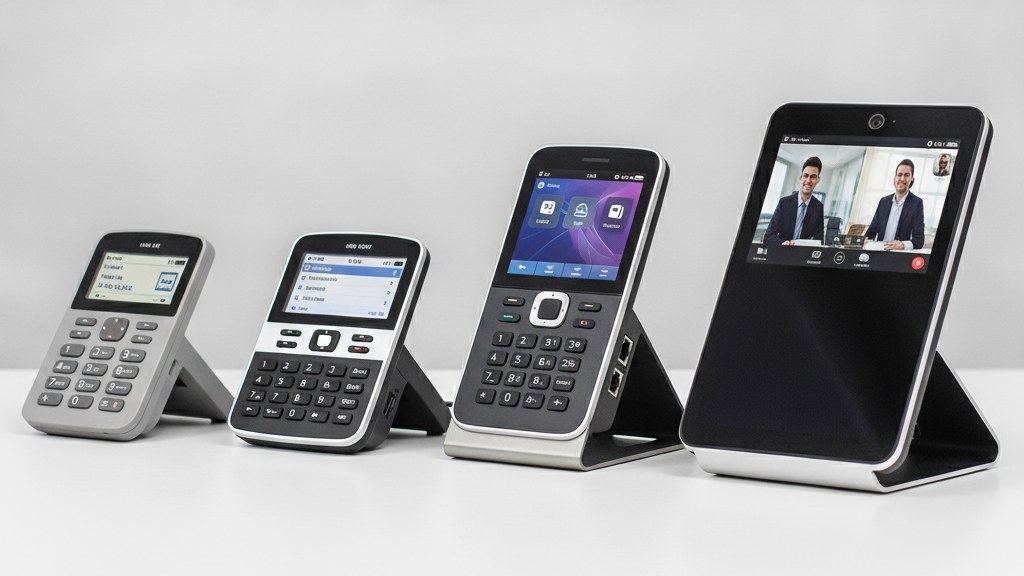
Full feature comparison
Use this table to shortlist models. SIP lines determine concurrent call capacity; display size matters for usability; Wi-Fi and Bluetooth determine whether you need a cable run or can use the phone wirelessly.
Phone tier map: role to hardware
| Model | Tier | SIP lines | Display | Wi-Fi | Bluetooth | PoE | Video |
|---|---|---|---|---|---|---|---|
| Yealink T54W | SMB | 16 | 4.3″ colour | Dual-band | 4.2 | Yes | No |
| Grandstream GRP2615 | SMB | 16 (10 keys) | 4.3″ TFT | Wi-Fi 6 | Yes | Dual Gigabit | No |
| Poly VVX 450 | Power | 12 | 4.3″ colour | No | No | Gigabit | No |
| Snom D865 | Power | 12 | 5″ IPS tiltable | 802.11n/ac | 5.0 | Yes | No |
| Fanvil X7A | Executive | 20 | 7″ Android touch | Yes | Yes | Check model | Optional (CM60) |
| Cisco 8845 | Executive | 5 | 5″ colour | No | Yes | Yes | 720p HD built-in |
Specs verified at manufacturer websites in June 2026. No pricing is listed here because reseller prices in South Africa change frequently. Request a bundled quote from your VoIP provider, who can often supply certified hardware more cost-effectively than retail.
Five questions to answer before you order
Buying hardware before confirming your platform leads to compatibility headaches. Answer these five questions first.
The right phone for the wrong platform is still the wrong phone. Confirm your provider’s certified hardware list before selecting a model. A certified handset auto-provisions in minutes; an uncertified one can take an afternoon to configure manually.
WhichVoIP editorial viewOrdering VoIP phones in South Africa
All six models in this guide are available from South African technology distributors. Most SA Cloud PBX providers can also supply hardware as part of a managed service.
Two sourcing routes are common in SA. The first is buying directly from a technology distributor or local IT reseller and provisioning the phones yourself or with your IT team. The second is getting hardware from your VoIP or Cloud PBX provider as part of a managed deployment, where phones are pre-provisioned with your SIP credentials before they ship. The second option reduces setup time significantly for deployments of 10 or more phones.
Whichever route you take, get quotes from multiple SA providers before committing. Hardware pricing and bundling options vary, and some providers discount hardware on longer-term service commitments.
Our recommendation
Start with your VoIP platform, not with a product page. Confirm which models your provider certifies, then select from that list using the tier framework above. For most SA SME offices, a mix of Tier 1 for basic desks and a Tier 2 model for active call users covers the bulk of seats without overspeccing. Add Tier 3 for reception and Tier 4 only where video is genuinely needed.
Avoid buying the same phone for every seat. A uniform specification saves procurement headaches but costs more than it should at basic desks and delivers less than it should at busy ones.
Compare VoIP providers in South Africa
Once you know which tier you need, use our free matching tool to compare SA VoIP and Cloud PBX providers. Many include hardware supply and pre-provisioning in their quotes.